
WooCommerce Shipping Costs: 7 Ways to Reduce What You're Paying
Canadian WooCommerce store owners are overpaying on shipping. Here are 7 practical ways to cut your costs, from packaging changes to automated invoice auditing.

ShipSherlock Team
Your Shipping Costs Are Higher Than They Need to Be
If you're running a WooCommerce store in Canada, shipping is probably one of your top three expenses. And unlike product costs or marketing spend, shipping feels like something you just have to accept. The carriers set the rates. You pay the rates. End of story.
Except it isn't. There are concrete steps you can take to reduce what you're paying, and most of them don't require renegotiating contracts or switching carriers. Some can be done this afternoon.
Here are seven that actually work.
1. Right-Size Your Packaging
This is the most overlooked cost reduction in e-commerce shipping. If you're using three or four standard box sizes for everything, you're almost certainly paying DIM weight charges on a significant portion of your shipments.
Dimensional weight pricing means carriers charge based on box volume, not just actual weight. A small product in a large box gets billed as if it weighs much more than it does.
The fix is simple but requires some effort: audit your top 20 SKUs by shipping volume. Measure the actual product dimensions. Source boxes that fit those products with minimal empty space. Custom-sized packaging costs more per unit than standard boxes, but the DIM weight savings often pay for the difference within the first month.
For WooCommerce stores, the WooCommerce Shipping plugin lets you set custom box dimensions per product, which helps your rate calculations match what you'll actually be charged.
2. Negotiate Your Rates (Yes, You Can)
Most small and mid-size WooCommerce stores don't realize that carrier rates are negotiable. If you're shipping more than 100 parcels a month with any single carrier, you have enough volume to ask for a discount.
Call your UPS or FedEx account rep and ask what they can do on your most common service type and weight bracket. Even a 10-15% discount on base rates adds up quickly. Carriers would rather give you a small discount than lose your volume to a competitor.
If you don't have an account rep, call the general business line. They'll assign one. Bring your shipping data: monthly volume, average weight, most common destinations. The more specific you are, the better deal you'll get.
Canada Post's Commercial Solutions program also offers volume discounts for businesses shipping more than 1,250 parcels per year.
3. Use Regional Carriers Where It Makes Sense
UPS and FedEx aren't always the cheapest option. For shipments within your province, regional carriers or Canada Post's domestic services can be significantly cheaper, especially for ground delivery.
Purolator, which is majority-owned by Canada Post, often offers competitive rates for business-to-business shipments within Canada. Their ground service covers most Canadian addresses and can be cheaper than UPS Ground or FedEx Ground for certain weight brackets and zones.
The tricky part is comparing rates across carriers for your specific shipment profile. WooCommerce plugins like WooCommerce Shipping or third-party rate comparison tools can help you display real-time rates from multiple carriers at checkout, so your customers choose the option that's best for both of you.
4. Offer Free Shipping With a Minimum Order Threshold
This isn't about reducing your per-package cost. It's about reducing the number of packages you ship while increasing your average order value.
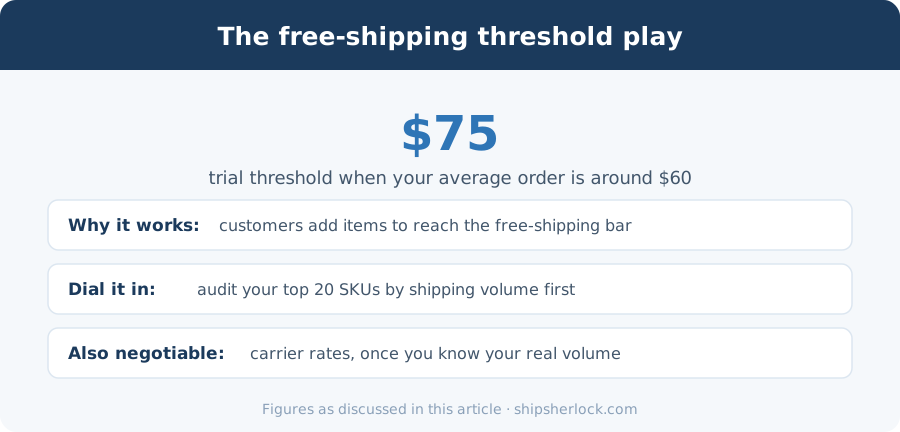
When you offer free shipping above a certain order total (say $75 or $100), customers tend to add items to their cart to hit the threshold. That means fewer orders, fewer packages, and often a higher profit margin per order even after absorbing the shipping cost.
The key is setting the threshold at the right level. Look at your average order value and set the free shipping minimum about 20-30% above it. If your average order is $60, try free shipping at $75.
5. Audit Your Invoices for Billing Errors
Here's where most WooCommerce store owners leave the most money on the table. Carrier invoices contain billing errors on roughly 5-10% of shipments. Late delivery refunds that were never claimed. Duplicate charges. Incorrect surcharges. DIM weight miscalculations.
The problem is that checking every line item on every weekly invoice takes time that most solo operators or small teams don't have. And the carriers aren't going to tell you about their own mistakes.
This is what ShipSherlock was built for. Our WooCommerce plugin connects your store's fulfillment data to our audit engine. We pull your carrier invoices daily, check every shipment against the invoice charges, and file refund claims automatically when we find errors.
It takes about two minutes to set up. Install the plugin, enter your API key, and your fulfillment data starts syncing. There's no cost unless we actually recover money for you.
6. Consolidate Shipments When Possible
If you're shipping multiple orders to the same customer in the same week, or multiple orders to the same geographic area, consolidation can save real money.
For WooCommerce stores that process orders in batches, consider holding orders for 24-48 hours to catch multiple orders from the same customer. A single larger package almost always costs less than two smaller ones.
You can also look at fulfillment timing. If you ship daily, you might find that batching shipments to twice a week reduces your total package count without significantly impacting delivery times for most customers.
7. Review Your Surcharges Quarterly
Carrier surcharges change frequently. Fuel surcharges adjust weekly. Extended area surcharges, residential delivery surcharges, and peak season surcharges all shift throughout the year.
Set a calendar reminder to review your shipping costs quarterly. Look at your average cost per package and your surcharge breakdown. If you see a sudden jump in residential surcharges, it might mean the carrier reclassified some of your delivery addresses. If fuel surcharges spike, it might be worth temporarily shifting volume to a carrier with lower fuel surcharge rates.
WooCommerce's order export features make it easy to pull this data. Export your orders with shipping costs for the last quarter and compare against the previous quarter. Any significant change is worth investigating.
The Easiest Win
Of these seven strategies, invoice auditing is the one with the least effort and the most reliable return. You don't have to change your packaging, renegotiate contracts, or restructure your fulfillment process. You just need someone checking your invoices, and that someone doesn't have to be you.
If you're a WooCommerce store owner shipping in Canada, check out our WooCommerce plugin. It's free to install, and you only pay when we find money that was being left on the table.
Related guides
Deadlines, eligibility and claim steps for the carriers covered above.
- Canadian Carrier Refund RulesFiling deadlines and eligible services for UPS, FedEx, Canada Post and Purolator, kept current.
- Savings CalculatorEstimate what your carriers likely owe you based on monthly shipping volume.
- Shipping Audit for Canadian SellersWhat a full invoice audit checks, and how much sellers typically recover.
Stop overpaying
Done reading? Start recovering.
ShipSherlock audits every invoice automatically. You pay nothing unless we find money your carrier owes you.