
Canada Post Overcharges: How to Find and Dispute Billing Errors
Canada Post billing errors are harder to catch than UPS or FedEx. Learn the most common Canada Post overcharges, how to dispute them, and the unique challenges of auditing Canada Post invoices.

ShipSherlock Team
Why Canada Post Billing Errors Are Different
If you've dealt with UPS or FedEx billing disputes, you know the drill: log into their portal, find the charge, click "dispute." Canada Post is a different beast entirely.
Canada Post's billing system is less transparent and their dispute process is more manual. There's no self-serve billing portal like UPS Billing Center. For most commercial shippers, invoices arrive as PDF statements, and disputes go through a ticket system.
This makes overcharge recovery harder — but certainly not impossible. And the overcharges themselves are just as common.
Common Canada Post Overcharges
Fuel Surcharge Miscalculations
Canada Post applies a fuel surcharge that fluctuates monthly based on diesel prices. The published rate and the rate on your invoice should match, but discrepancies happen — especially when a shipment spans a rate change period.
Check: compare the fuel surcharge percentage on your invoice against Canada Post's published rate for that billing period.
Incorrect Weight/Size Classification
Canada Post uses weight and dimensions to determine pricing tier. Packages near the boundary between tiers (e.g., 499g vs 501g) are sometimes rounded up incorrectly. Similarly, oversized surcharges can be applied when a package is within standard dimensions.
Check: if you have consistent package sizes, flag any charges that jump to a higher tier unexpectedly.
Delivery Standard Failures
Canada Post's delivery standards aren't technically a "guarantee" in the same way UPS Express is, but their commercial service (Expedited Parcel, Xpresspost, Priority) does come with service commitments.
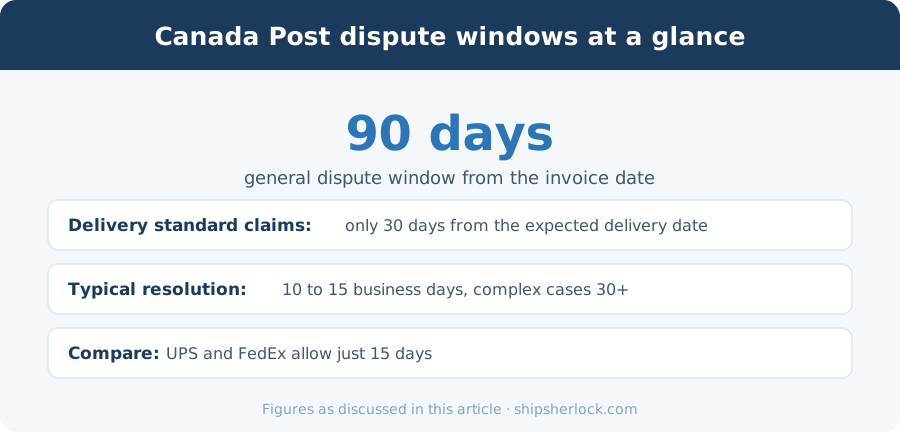
For Xpresspost and Priority shipments that arrive after the committed delivery date, you may be eligible for a credit — but only if you file a service ticket within 30 days.
Check: compare actual delivery dates against Canada Post's published delivery standards for the origin-destination pair.
Duplicate Charges on Returned Parcels
When a parcel is returned to sender (address issue, refused, etc.), some sellers get charged both the outbound and a return shipping fee — even when the return was caused by a Canada Post delivery error.
Check: look for tracking numbers with "Return to Sender" events that still show outbound charges.
Incorrect Commercial vs Retail Pricing
Commercial account holders pay different (lower) rates than retail. If you have a contract with Canada Post, verify that your invoice reflects your contracted rates — not the posted retail rates.
This error is rare but catastrophic when it happens, as the difference between commercial and retail rates is typically 15-25%.
How to Dispute Canada Post Charges
Step 1: Document the Error
Before contacting Canada Post, have your evidence ready:
- Invoice number and line item
- Tracking number(s) affected
- What was charged vs. what should have been charged
- Supporting documentation (package dimensions, delivery scans, etc.)
Step 2: File a Service Ticket
Canada Post's dispute process runs through their Business Support team:
- Online: Canada Post Business portal → Support → Billing Inquiry
- Phone: 1-866-607-6301 (Business Customer Service)
- Email: Through your account representative (if assigned)
Step 3: Track and Follow Up
Canada Post's resolution timeline is typically 10-15 business days, but complex cases can take 30+. Unlike UPS, there's no self-serve status tracker — you'll need to follow up manually.
The Filing Deadline
Canada Post's general dispute window is 90 days from the invoice date — much more generous than UPS or FedEx's 15 days. However, for delivery standard claims specifically, the window is 30 days from the expected delivery date.
Despite the longer window, don't delay. The longer you wait, the harder it is to gather evidence, and the less likely Canada Post is to issue credits.
Unique Challenges for Canadian E-commerce Sellers
Volume Discounts Complicate Auditing
If you have a contract with Canada Post that includes volume-based discounts, your effective rate changes as your volume changes. This makes it harder to verify whether a specific charge is correct without knowing your current discount tier.
Limited API Access
Unlike UPS and FedEx, Canada Post doesn't offer a comprehensive billing API. Invoice data usually comes as a PDF or summary statement, making automated auditing more difficult (but not impossible — PDF parsing with AI handles this well).
Seasonal Rate Changes
Canada Post changes rates annually (usually January) and adjusts fuel surcharges monthly. Invoices spanning these transitions can mix rates, making spot-checking more confusing.
What to Do Next
If you're shipping more than 100 packages per month through Canada Post:
- Download your last 3 months of invoices
- Spot-check 10 random charges against published rates
- Look specifically for packages near weight/size tier boundaries
- Check Xpresspost and Priority deliveries against committed delivery dates
- Flag any tracking numbers that appear more than once
Even a manual spot-check often reveals hundreds of dollars in overcharges. Automated auditing catches everything — including the errors you'd never think to look for.
Related guides
Deadlines, eligibility and claim steps for the carriers covered above.
- Canadian Carrier Refund RulesFiling deadlines and eligible services for UPS, FedEx, Canada Post and Purolator, kept current.
- Canada Post OverchargesOn-Time Delivery Guarantee claims and the 30-business-day deadline.
- Shipping Audit for Canadian SellersWhat a full invoice audit checks, and how much sellers typically recover.
Stop overpaying
Done reading? Start recovering.
ShipSherlock audits every invoice automatically. You pay nothing unless we find money your carrier owes you.